2020-7-22 seo達人
Vuex 是一個專為 Vue.js 應用程序開發的狀態管理模式。它采用集中式存儲管理應用的所有組件的狀態,并以相應的規則保證狀態以一種可預測的方式發生變化。Vuex 也集成到 Vue 的官方調試工具 devtools extension,提供了諸如零配置的 time-travel 調試、狀態快照導入導出等高級調試功能。采用了全局單例模式,將組件的共享狀態抽離出來管理,使得組件樹中每一個位置都可以獲取共享的狀態或者觸發行為。
那么什么是狀態呢?我把狀態理解為在沒有使用vuex時,在當前組件中data內需要共用的數據為狀態。
vuex使得狀態或行為成為了共享的狀態,所共享的狀態或行為可以在各個組件中都可以訪問到,省去了子父或子子之間傳遞變量,提高了開發效率。
當我們不使用vuex時,對于組件之間傳遞信息會較為麻煩。
App.vue文件中:
<template>
  <div id="app">
      <Fruits :fruitList="fruitList"/>
  </div>
</template>
<script> import Goods from './components/Goods'; export default { name: 'App',
  components:{
    Fruits,
    Goods
  }, data(){
    return{ goodList:[
      {
        name:'doll',
        price:12 },
      { name:'glass',
        price:10 }
    ],
    }
  }
}
</script>
<style>
</style>
Good.vue文件中:
<template>
  <div class="hello">
      <ul>
        <li v-for="(good,index) in goodList" :key="index"> name:{{good.name}} number: {{good.number}} {{index}}
        </li>
      </ul>
  </div>
</template>

<script> export default { props:['goodList'],
}
</script>
<style>

</style>首先先創建一個js文件作為兩兄弟之間傳輸的紐扣,這里起名為msg.js
//創建并暴露vue import Vue from 'vue';
export default new Vue
兄弟組件Goods:
<template>
  <div>
        <button @click="deliver">點擊</button>
  </div>
</template>

<script> import MSG from '../msg';
export default {
  data(){ return{
      msg:'hahah' }
  },
  methods:{
    deliver() {
        MSG.$emit('showMsg',this.msg)
    }
  }

}
</script>
<style>

</style>
兄弟組件Fruits:
<template>
  <div>
      <div class="fruit">
          {{text}}
      </div>
  </div>
</template>
<script> import MSG from '../msg';
export default {
    data(){ return{
        text:'' }
    },
    created(){ this.getMsg()
    },
    methods:{
      getMsg(){
        MSG.$on('showMsg',(message)=>{ this.text = message
        })
      }
    }
}
</script>
<style>
</style>
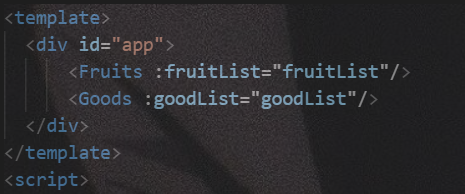
在App組件中的代碼:
點擊按鈕:
藍藍設計( www.wtxcl.cn )是一家專注而深入的界面設計公司,為期望卓越的國內外企業提供卓越的UI界面設計、BS界面設計 、 cs界面設計 、 ipad界面設計 、 包裝設計 、 圖標定制 、 用戶體驗 、交互設計、 網站建設 、平面設計服務